
From Zero to a Perfect Prompt
in Five Steps
Follow this guide from top to bottom. By the end you will have a workspace ready, know exactly what to type, and get genuinely useful answers from AI every time — no tech experience needed.
Get Four AI Tools Open and Ready
Before you type a single question, spend five minutes building a permanent AI workspace. Done once — pays off every single day. Click the button below for the exact steps to set it up on your computer.
Download Arc Browser — free at arc.net
Arc pins your AI tools to a permanent left sidebar so Claude, ChatGPT, Gemini, and Grok are always one click away — no searching through open windows or bookmarks.
Create free accounts on all four AI tools
Sign up at claude.ai, chatgpt.com, gemini.google.com, and grok.com — all completely free, no credit card required. You only need an email address.
Pin all four tabs to the Arc sidebar
Right-click each AI tab and choose "Pin to Sidebar." Rename each one so you can tell them apart at a glance. They stay pinned even after you close Arc and reopen it tomorrow.
Open a plain-text notepad alongside
Open Notepad (Windows) or TextEdit (Mac) alongside your AI window. AI chats on free plans are not saved permanently — copy any useful answer into your notepad before closing the tab.
Save the whole setup as an Arc Space
Create an Arc Space containing your four AI tabs plus your notepad. Name it "AI Workspace." From now on, opening that Space restores your entire setup in one click every morning.
Still prefer to use your own browser? No problem, just skip to Step 2.
✅ This is what your finished workspace looks like
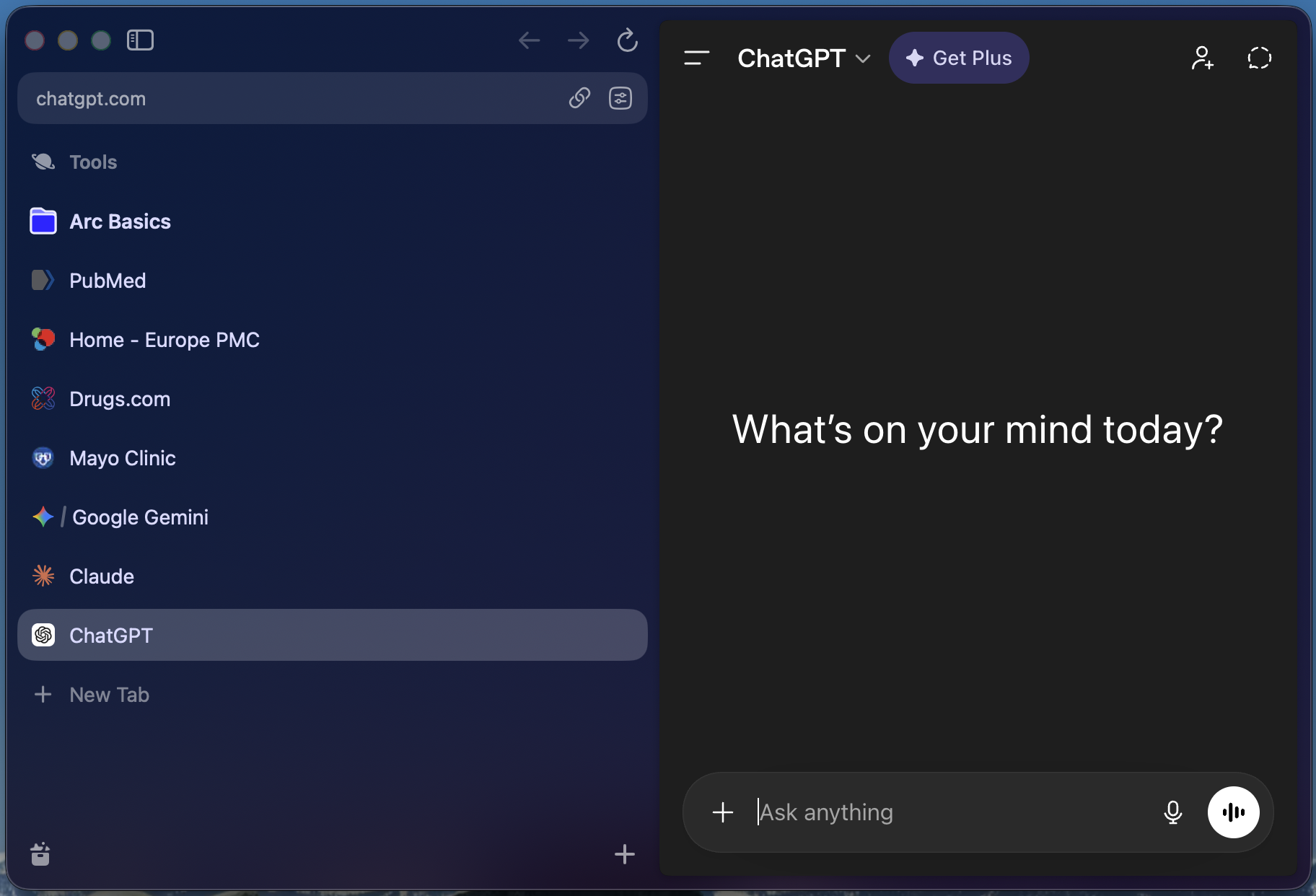
Arc browser with AI tools and medical research sites pinned permanently to the left sidebar — everything one click away.
Match Your Question to the Best AI
Every AI tool has a sweet spot. Matching your question to the right one takes five seconds and gets you a dramatically better answer. This table is your quick-reference guide.
| Your Goal | Best Tool | Why |
|---|---|---|
| 🏥 Health & Medical Research | Claude or Gemini | Careful with facts; least likely to fabricate sources |
| 📰 Current Events / Breaking News | Copilot or Grok | Built-in real-time web search |
| ✏️ Writing, Editing & Drafting | Claude or ChatGPT | Natural, readable, nuanced writing |
| 💻 Microsoft 365 Users (Word / Excel) | Copilot | Lives inside your apps — no copy-paste needed |
| 📊 Math & Data Calculations | ChatGPT or Gemini | Strongest built-in math and data reasoning |
| 🖼️ Image & Video Analysis | Gemini | Best native support for photos and video clips |
| 💰 Financial / Medicare Research | Claude or ChatGPT | Detailed, structured, nuanced explanations |
| ✈️ Travel Planning | Gemini or ChatGPT | Strong at itineraries and current travel info |
"Use AI as your starting point — not your final answer."
Ask AI → Review key facts → Verify anything medical, legal, or financial with a professional.
The C.A.R.E. Framework —
Four Lines That Change Everything
A "prompt" is simply what you type to AI. Most people type one vague sentence and get a vague answer. Four lines using C.A.R.E. gives AI everything it needs to deliver a useful, personalized response.
Context
Who you are and relevant background — age, health conditions, situation. Helps AI personalize the answer to you specifically.
Action
Exactly what you want AI to do — explain, summarize, list, compare, draft. Be specific about the task.
Result
What the finished answer should look like — plain English, bullet points, question list, table. Tell AI the format.
Exclusions
What you do NOT want — no jargon, no lengthy disclaimers, no "see a doctor" when you already have one.
✅ Real Example — Medical Research
📝 Fill-In-the-Blank Template
Copy this into any AI tool and fill in the blanks:
Try It With Something You Already Have
The fastest way to see how powerful AI really is — use a document you already have. Pick a letter, bill, or report sitting on your desk right now and follow these three steps.
Pick your document
Choose any letter, bill, or report you have on hand: an insurance letter, a medical report, a contractor estimate, an IRS notice, or even a confusing HOA letter.
Open Claude or ChatGPT and attach it
In Claude (claude.ai) or ChatGPT, look for the paperclip icon or attachment button. Upload your document or a photo of it. Before uploading: black out your SSN, account numbers, and date of birth.
Paste this ready-made C.A.R.E. prompt
Copy the prompt below and paste it into the AI chat alongside your document.
Not getting the answer you need? That is exactly what a Written Answer session is for. Submit your document and question to Gary — $75, plain-English response within 24 hours.
Submit My Question →Not Happy With the Answer? Here's What to Do
AI is a conversation, not a search engine. If the first answer misses the mark, don't start over — just follow up in the same chat. Most people get dramatically better answers on the second or third message.
Ask for simpler language
If the answer feels too technical or hard to follow, say so directly. AI will rephrase in plain English.
Ask for a different format
If the answer is a wall of text, ask AI to reorganize the exact same information into a more readable format.
Add more context
If the answer feels too generic, give AI more details about your specific situation. The more it knows about you, the better the answer.
Ask for doctor-ready questions
At the end of any medical AI conversation, turn the research into a usable list you can print and bring to your appointment.
Try a second AI tool and compare
If one AI's answer doesn't feel right, open a second tab and ask the same question. Where two AIs agree, you can feel much more confident.
Skip the Blank Page —
Your Questions Are Already Written
The SAC Prompt Builder gives you ready-to-use C.A.R.E. prompts across 17 categories — health, Medicare, travel, financial, legal, family caregiving, and more. Every prompt is engineered to get AI's sharpest answer in plain English.
50+ Expert-Built Prompts, Ready to Use
Browse free and member categories covering every topic that matters in retirement. No account required to start.
Open the Prompt Builder →Want Gary to Walk You Through It Live?
Book a personal 1-on-1 session — Gary will set up your workspace, run your first C.A.R.E. prompt with you, and answer your questions on Zoom.